5. How to take noise-free photos
What is noise
Noise is a side effect of digital technology. While the camera sensor captures the image signal, a small part of that signal is faulty and creates noise. In the image, noise shows up as random grainy pixels mixed in among the good pixels, so noise takes away the natural smooth transitions and the crisp sharpness of the image.
There is more noise in the dark areas
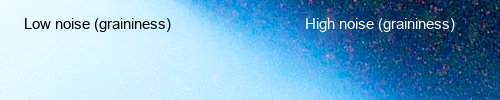 In digital, noise always has a low value, so noise is present far more in the dark areas than in the bright areas. Because noise is an error that grows more slowly than the amount of signal the sensor takes in, in the bright areas, which are represented by many tonal levels, noise has a higher signal-to-noise ratio (SNR). Meanwhile, the dark areas are represented by fewer tonal levels, so the SNR is lower.
A high SNR means high image quality, and this is exactly the goal you want to reach in digital photography.
Why noise increases when you underexpose
An image is made up of pixels, and pixels are shown with many different tonal levels of light and dark to reproduce the details from the brightest to the darkest in a digital image. The difference in light from the brightest to the darkest described above is called Dynamic Range, and it is measured in aperture stops, f-stops, or stops for short. When the camera records this light data into the RAW file, each f-stop for each light zone is represented by a number of tonal levels with a brightness that matches that zone.
In digital, each f-stop of each light and dark zone in the image does not hold an equal share of the tonal levels the image file has (e.g. a 14-bit file has 16,384 tonal levels), but follows this algorithm: the first f-stop, of the brightest zone, holds 50% of all the tonal levels an image file can have, the 2nd f-stop holds 50% of the rest, i.e. 25% of the total, and the next, 3rd f-stop holds 50% of the rest, i.e. 12.5% of the total, and so on until the last f-stop, i.e. the stop that holds the light of the darkest zone the sensor can capture.
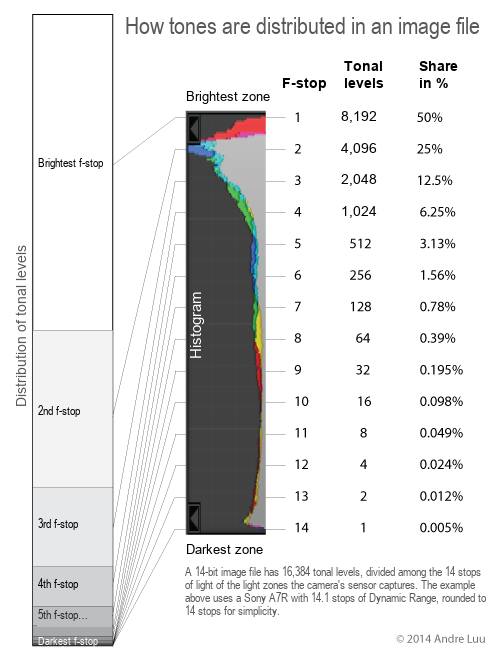
Because digital cameras record data this way, you need to remember 2 very important things in digital photography: 1. If you underexpose by 1 stop, you have lost 50% of the tones in the image; if you underexpose by 2 stops, you lose a full 75% of the tones. 2. Give exposure priority to the bright areas, because the bright areas hold most of the tonal levels of the image file and have less noise than the dark areas. Note: Shooting with automatic metering, whether you use spot, center-weighted or matrix metering, is not optimal in any case. |
The fewer tones recorded, the more noise
Noise is a percentage of errors out of the total number of tones, so the fewer tones recorded in the file, the more noise, and conversely, the more tones recorded in total, the less noise. If you shoot with the optimal exposure (capturing the maximum number of tones in the image file that your camera’s sensor allows), noise will be at its lowest and the image as clean as your sensor allows.
See also How to Optimize Exposure with the Histogram

Noise increases when you brighten the image in post-processing
When your image needs brightening, it means it is dark and the f-stop of the brightest zone has no data or holds little data. As analyzed above, the first step (the brightest f-stop) alone holds 50% of the tonal levels of the image your sensor can capture, so when it is not optimized, the loss of tonal levels is too large. This is the common case that causes the most noise.
Besides that, the dark areas by nature already hold more noise than the bright areas, so when they are brightened, the noise is exposed. The more you brighten during processing, the more noise will show.
Solution: Shoot with the most optimal exposure your camera’s sensor allows
To record the maximum number of tones of the image into the image file, you should expose for the bright areas, so that the Histogram just touches the right edge of the graph. Doing this, the image may be brighter than you want to express, but that is fine, because you can adjust the image darker when processing the Raw file. Darkening an image does not reduce image quality and does not increase noise.
This is even more important for types of photos that have many dark areas, such as backlit photos, sunrises, sunsets, long exposures of the city at night, or the moon and stars.

Noise increases when you change white balance in post-processing
Changing colors in post-processing also makes noise appear, because different colors have different brightness tones, for example yellow has a brighter tone than blue, so when we change from a color with a dark tone (e.g. Blue) to a color with a bright tone (e.g. Yellow), as when you raise the K temperature in White Balance, you also raise the brightness of the image at the same time and therefore increase noise, but because colors change brightness only a little, the effect on noise from changing colors is also small, depending on the size of the change.
Solution: Set White Balance correctly when shooting
Set the white balance the way you want to express it, to limit having to adjust it a lot in post-processing.
When you are not sure, you should use a White Balance a little warmer (with a higher K value) than you want, because it has a brighter tone than a cool White Balance (low K value). When you correct the WB in processing, you only darken the image, and that does not increase noise. If you shoot following How to Optimize Exposure with the Histogram, you still have spare brightness without needing to brighten the image further.

Noise increases when the sensor gets hot
When the sensor gets hot, the photodiodes in the sensor leak and create errors, which become noise.
Solution: Keep the Camera Sensor Cool
- Limit leaving the camera out in the sun; use an umbrella for shade when needed.
- Limit long use of Live View, because Live View uses the sensor continuously and heats the sensor up.
- Limit exposing longer than needed for the effect you want, because the shutter is held open, so the sensor works continuously and heats up.

Noise increases when you crop or enlarge the image
At the same size and with all other factors equally optimal, if your image uses the full area of the sensor, meaning it is shot that way with no cropping down, then that image has the largest amount of data. When you shoot wide and crop afterward, the cropped part is a smaller part of the image, and when viewed or printed at the same size, the enlarged cropped image has less data, so it exposes more noise than the uncropped image.
Noise increases when you raise ISO
When you raise ISO, you amplify the sensor’s signal and create more noise. Use the default ISO: on full-frame cameras it is usually 100, and on crop cameras it is usually 100 as well.
However, in practice, when you need to set the shutter speed you want, you can also change ISO within a range of +/- 2 stops without affecting image quality. In addition, newer-generation cameras can use ISO 1600 or higher and the images are still nearly as good as at the default ISO. For example, the default ISO of your camera is 100. Then you can use 50, 100, 200 up to 400 and the images are still good.
Noise increases when the diode density on the sensor increases
At the same resolution, a small sensor has its diodes placed close together, so it heats up, leaks and creates noise more easily than when they are spaced farther apart, as in a large sensor. When buying a camera, if you can afford it, you should buy a full-frame camera rather than a crop camera. Likewise, with the same sensor size and other factors equal, a camera with a lower resolution will have less noise.

This article is for general education and is provided "as is". Photography outdoors carries risk: you are responsible for your own safety, gear and decisions. Disclaimer
Fine art prints
Signed, made to order on archival fine art paper, with the facts behind every photograph.
See the prints
Photo trips with Andre
Small groups to Lofoten, Iceland and Vietnam, at the right season and the right hour.
Ask about the next trips